 EN
 Nederlands
ClickFource vs ClickPatrol
Looking for a ClickPatrol alternative? Both tools come from the Netherlands and block suspicious IP addresses in Google Ads. The difference is in the price, how the trial works and what you get for PMax and YouTube. Here they are side by side.
- From
- € 49 per month
- Priced by
- Your ad spend, unlimited clicks
- Free trial
- 14 days, protected from day 1
- PMax, YouTube, Display
- Placement Guard, € 29 per month
- From
- € 71 per month, € 59 billed yearly
- Priced by
- Protected clicks, 5,000 on the smallest plan
- Free trial
- 7 days, detection only
- PMax, YouTube, Display
- Not listed as a feature
Why businesses switch.
Pay by ad spend
You pay based on your ad spend, not per click. A month with lots of clicks costs you nothing extra.
PMax and YouTube too
With Placement Guard you exclude kids’ channels, game sites and apps in Performance Max, YouTube and Display.
Protected from day 1
During the 14-day trial ClickFource already blocks. Cancel during the trial and you pay nothing.
From Google Ads specialists
Built by Fource Online, an agency that manages Google Ads campaigns every day. Reports in euros, support in English and Dutch.
ClickFource and ClickPatrol compared.
| Feature | ClickFource | ClickPatrol | Why it matters |
|---|---|---|---|
| Starting price | € 49 per month, excl. VAT | € 71 per month, € 59 billed yearly, excl. VAT | ClickFource starts lower. |
| Priced by | Ad spend, unlimited clicks | Protected clicks (5,000 on the smallest plan). Go over and you move up a plan automatically | More clicks do not mean a more expensive plan with ClickFource. |
| Free trial | 14 days, protected from day 1 | 7 days, detection only, with a € 0.01 card check | With ClickFource you are already protected during the trial. |
| Block IP addresses in Google Ads | Yes | Yes | The core of both tools. |
| Placement exclusions in PMax, YouTube and Display | Yes add-on, € 29 per month | Not listed as a feature | In PMax a lot of budget goes to apps and kids’ channels. |
| Other channels, such as Meta, Microsoft and TikTok | No, Google Ads only | Yes | If you mainly advertise on Google Ads, you do not pay for channels you do not use. |
ClickPatrol details come from clickpatrol.com/pricing, checked on 26 November 2026. Prices and features can change. Spotted something that is out of date? Let us know and we will fix it.
Everything in one overview.
Every day you see how many clicks are suspicious, which IP addresses are blocked and what that saves you. Undoing a block takes one click.
See the demo →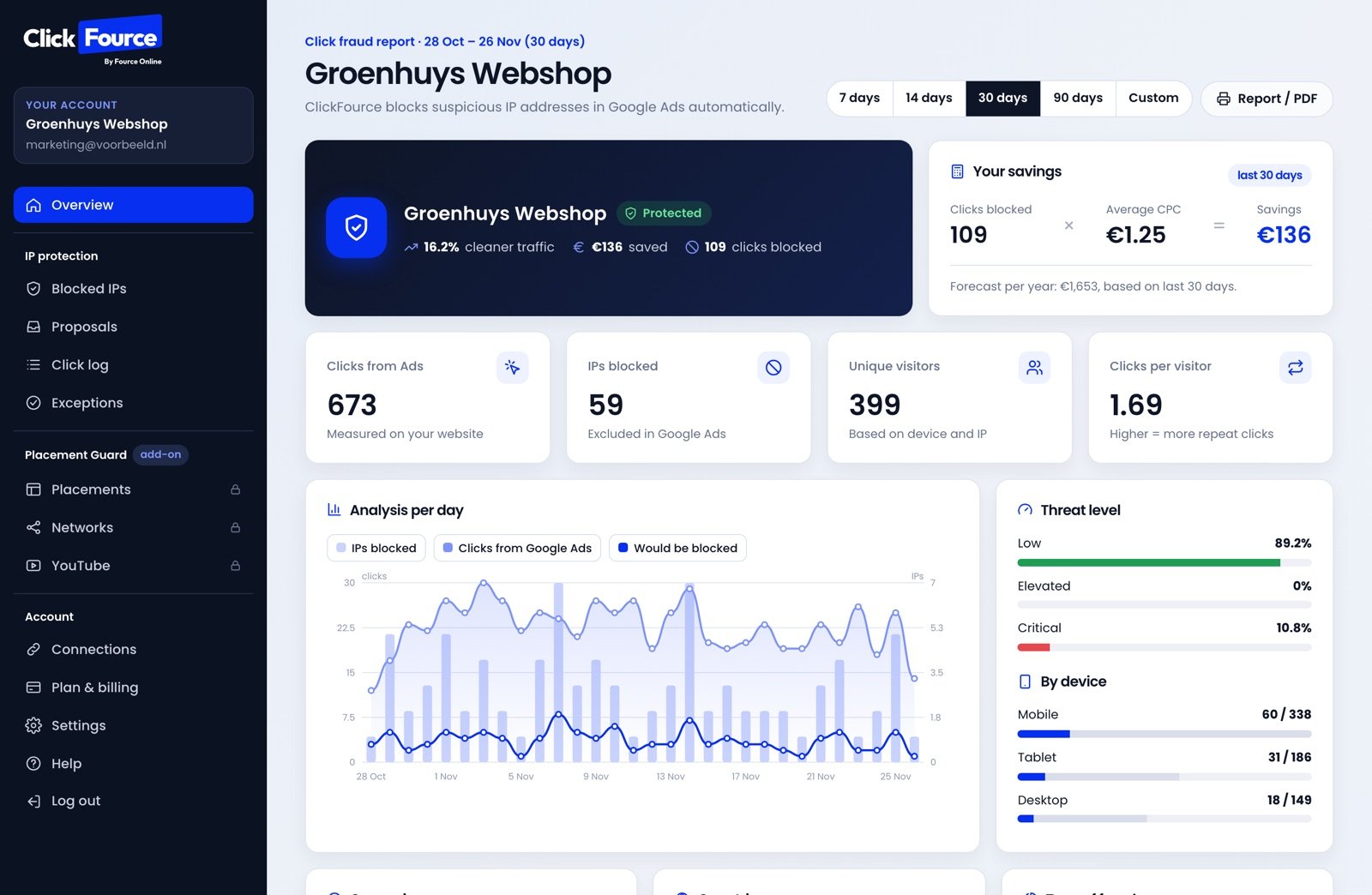
ClickFource fits you if
- you mainly advertise on Google Ads
- you also run Performance Max, YouTube or Display
- you want a fixed point of contact at a Google Ads agency
- you want a European point of contact
ClickPatrol fits better if
- you advertise on many channels, such as Meta, TikTok or LinkedIn
- you want audience exclusions on top of IP exclusions
Switch in three steps.
Start your trial
Choose a plan and connect your Google Ads account. You pay nothing for the first 14 days.
Add the tracking code
Add our tracking code and tracking template. Remove the ClickPatrol ones so they do not get in each other’s way.
Cancel ClickPatrol
Your IP exclusions stay in Google Ads. ClickFource takes over managing the list.
About switching.
Not sure if ClickFource fits you? Send us a message and we will look at your account together.
Contact usIs ClickFource a good ClickPatrol alternative?
If you mainly advertise on Google Ads, yes. Both block suspicious IP addresses. ClickFource starts lower, charges by ad spend instead of clicks, protects you during the trial and, with Placement Guard, also excludes bad placements in PMax, YouTube and Display.
Can I use ClickPatrol and ClickFource at the same time?
Better not. Two tools that both manage the exclusion list in Google Ads get in each other’s way. Start your ClickFource trial and remove the ClickPatrol code.
What happens to my blocked IP addresses?
They stay in your Google Ads account. Google allows up to 500 IP addresses per campaign. ClickFource then manages that list and makes room by removing old blocks.
Does ClickFource work for Meta or Microsoft Ads?
No, ClickFource is built for Google Ads. That also means you do not pay for channels you do not use.
How many fake clicks do you get?
Try it free for 14 days. Connect your account, ClickFource blocks suspicious clicks right away and you see exactly what it saves you.
- Protected from day 1
- Cancel during the trial at no cost